
Model Number Finder

Ovens (Built-In)


How to Find an Oven Model Number
For built-in single and double ovens, the rating plate is typically found:
On the side edge of the oven cavity, visible when the door is open, Along the front frame of the oven, sometimes behind a small flap, On the rear of the appliance if it can be safely accessed
If you can’t see it, check the original installation manual or box if kept
Dishwashers

How to Find a Dishwasher Model Number
For dishwashers, the model number is usually found:
On the side edge of the door, visible when the door is fully open, Along the top or bottom edge of the door frame, On the inner rim, sometimes hidden until the door is opened fully. The label will show model and serial numbers together with a barcode
Washing Machines And Tumble Dryers
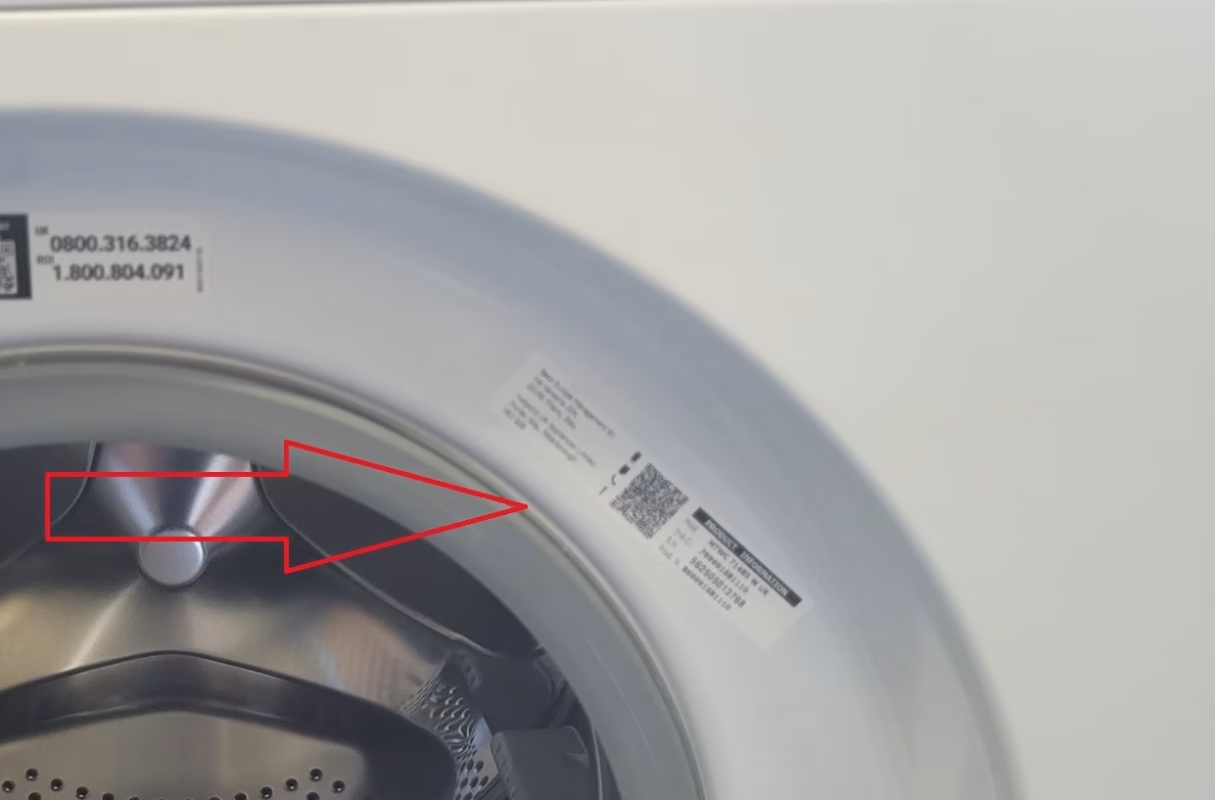
How to Find a Washing Machine Model Number
On most washing machines, the rating plate showing the model number is located: Around the inside rim of the door, visible when the door is open On the rear panel of the machine, near the water hoses
Occasionally on the side panel of the machine Look for a sticker with a model number (often starting with letters, e.g. WM or similar) alongside a serial number and barcode
Cooker Hoods

How to Find a Cooker Hood Model Number
Remove the filters and look inside to the right or left inside the hood, you should see a sticker with the model number and serial number.
On some hoods the sticker is on the back inside after removing the filters. If you need help get in touch.
Fridges and Freezers

How to Find a Fridge Freezer Model Number
In a fridge the model number is usually under the bottom drawers on the side of the appliance, on some models like Samsung it is on the left hand side of the fridge.
For Freezers, look on the right or left of the appliance you should see the sticker If you have any problems finding the model number, get in touch we may be able to assist you.